
How Online Pregnancy Test Scanners, Checkers, and Readers Actually Work
Why People Use a Pregnancy Test Scanner
You've taken the test, waited the three minutes, and now you're holding it under the bathroom light asking: is that a line, or am I imagining it? That moment is exactly why pregnancy test scanners — also called pregnancy test checkers or pregnancy test readers — exist.
These tools take a photo of your test and analyze it to tell you whether a test line is present and how strong it is. Some are simple websites that let you invert or enhance an image; others are AI-powered apps that have learned what positive, negative, faint, and invalid tests look like. Our own pregnancy test scanner is one of them.
This guide explains what happens behind the scenes when you scan a test, what these tools can and can't tell you, and — most importantly — how to take a photo that gives the scanner the best chance of reading it correctly.
First, a Quick Refresher: What the Test Itself Is Detecting
A scanner doesn't detect pregnancy — the test strip does. Home pregnancy tests are lateral flow immunoassays. As urine travels along the strip, it meets antibodies that bind to human chorionic gonadotropin (hCG), the hormone produced after a fertilized egg implants.
- The control line (C) always appears if the test worked and enough urine was absorbed.
- The test line (T) appears when hCG is above the test's detection threshold — typically 10–25 mIU/ml depending on the brand.
- The more hCG present, the darker the test line tends to be — which is why early positives are often faint.
Everything a scanner does is based on reading those colored lines from a picture. That means the result can only be as good as the test, the timing, and the photo.
Let AI Check Your Pregnancy Test
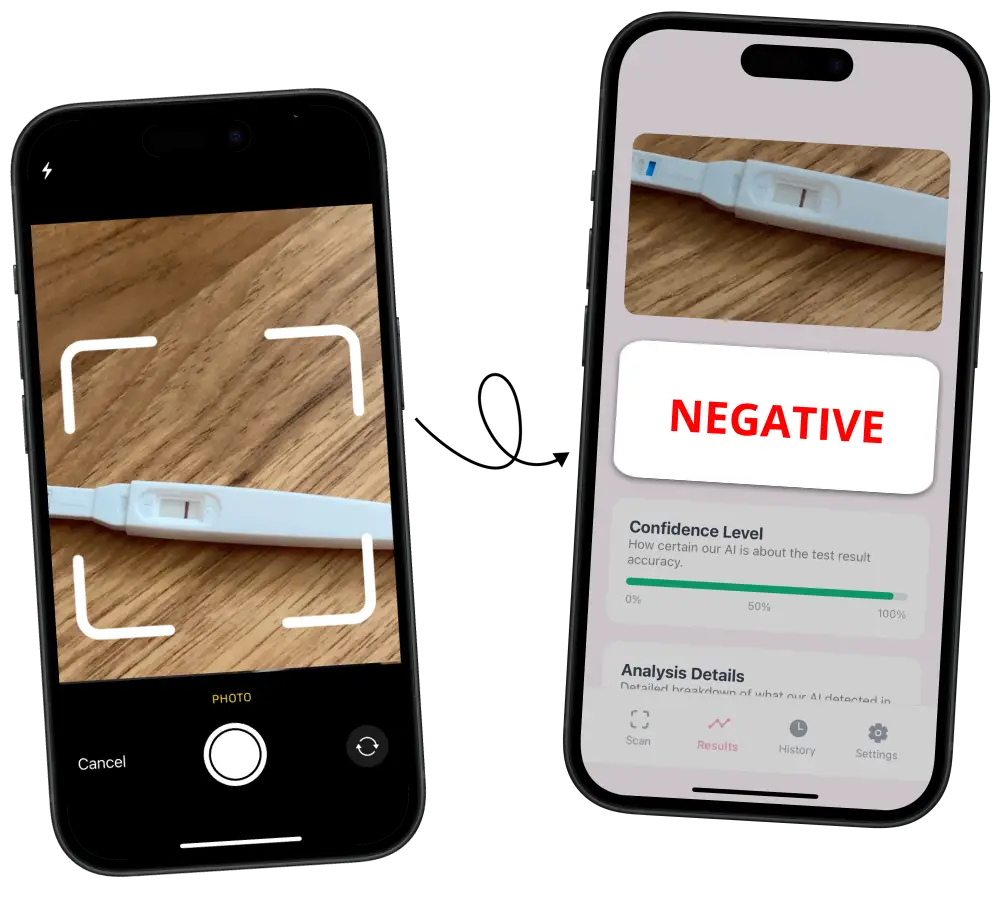
Just take a photo and get result

How a Pregnancy Test Scanner Reads Your Photo, Step by Step
Different tools use different techniques, but most pregnancy test reader apps follow a similar pipeline.
1. Finding the Test in the Image
The first job is object detection: locating the test stick or cassette in the photo and ignoring everything else — your hand, the sink, the box. Modern apps use computer vision models trained on thousands of test images so they can find the test even if it's slightly rotated or off-center.
2. Locating the Result Window
Once the test is found, the scanner zooms in on the result window — the small area where the control and test lines appear. This matters because shadows, printed text, and the plastic edge of the window can look like lines to a naive tool.
3. Enhancing the Line Area
Next, the image is normalized. Typical steps include:
- White balance correction so a warm bathroom light doesn't tint the whole strip pink
- Contrast enhancement to make faint pigment easier to separate from the background
- Color channel analysis — pink and blue dye stand out differently in different color channels, and inverting the image is a simple version of this idea
- Noise reduction to smooth out camera grain that could mimic a line
4. Measuring the Lines
The scanner then measures color intensity across the result window, looking for a band that is consistently darker than the background and runs across the full width of the strip. It compares the test line against the control line, since the control line tells it what a "definite" line looks like in that particular photo and lighting.
5. Classifying the Result
Finally, an AI model weighs all of that information and classifies the test — for example as positive, faint positive, negative, or unclear. Good AI checkers have been trained on real photos of many brands, including pink-dye and blue-dye tests, so they learn the difference between a true faint line, an evaporation line, and a shadow.
This is the approach behind Pregnancy Test Checker AI: you snap a photo, the app analyzes the result window, and you get a clear reading in seconds instead of squinting at the strip under different lights.
Simple Online Checkers vs. AI Scanner Apps
Not every "pregnancy test checker" works the same way. Here's how the main types compare:
Image Editing Tools (Inverters, Filters)
Tools like a pregnancy test inverter flip the colors or boost contrast so a faint line pops out visually. They're fast, free, and private, but they don't interpret anything — you still decide whether what you see is a line. They can also exaggerate shadows and indent lines.
Community "Line Eye" Forums
Posting a photo to a forum and asking strangers to vote is common, but results depend heavily on photo quality and opinion. Heavily filtered or tweaked photos often get misleading answers.
AI Pregnancy Test Scanner Apps
AI apps combine image enhancement with a trained classification model. Rather than just making the line easier to see, they give you an interpretation — which is especially helpful for very faint lines where your eyes and your hopes can play tricks on you.
How to Take a Photo of Your Pregnancy Test for an Accurate Scan
The single biggest factor in scanner accuracy is the quality of your photo. A blurry, shadowy, or color-tinted image can hide a real line or create a fake one. Follow these steps:
1. Photograph Within the Reading Window
Take the photo within the time frame printed on your test's instructions — usually 3 to 5 minutes, and never after 10. After that window, urine evaporates and can leave a faint grey evaporation line that neither you nor a scanner should trust.
2. Use Natural, Even Light
- Daylight near a window is ideal — bright but indirect
- Avoid warm yellow bathroom bulbs, which tint the strip and make faint pink lines harder to separate
- Turn off the flash — it causes glare on the plastic window and washes out faint lines
- Make sure your hand or phone isn't casting a shadow across the result window
3. Place the Test on a Plain, Light Background
Lay the test flat on a white or neutral surface such as a sheet of paper or a clean countertop. Busy patterns and colored surfaces confuse both auto-exposure and object detection. A flat surface also keeps the strip at one distance from the lens, so the whole window stays in focus.
4. Hold the Phone Directly Above the Test
Shoot straight down, parallel to the test, rather than at an angle. Angled shots distort the result window and can make the plastic edge cast a line-like shadow. Keep the whole test in frame, with the result window roughly in the center.
5. Get Close — But Let the Camera Focus
- Move close enough that the result window fills a good part of the frame
- Tap on the result window on your screen to set focus and exposure there
- If the image looks soft, move back slightly — most phones can't focus closer than about 10 cm without macro mode
- Hold still or brace your elbows on the counter to avoid motion blur
6. Don't Filter, Crop Aggressively, or Edit
Upload the original, unedited photo. Beauty filters, "vivid" modes, heavy compression, and screenshots of screenshots all alter color data the scanner depends on. Let the app do the enhancement — that's its job.
7. Take Two or Three Shots
Snap a few photos and scan the sharpest one. If results differ between photos, that's a sign lighting or focus is affecting the reading — adjust and try again.
Let AI Check Your Pregnancy Test
Just take a photo and get result
Common Photo Mistakes That Fool Pregnancy Test Scanners
- Photographing a dried-out test hours later — evaporation lines can look like faint positives
- Shooting through the test's plastic at an angle — the window edge creates a shadow line
- Using the flash — glare hides faint pigment entirely
- Holding the test in your fingers — skin tones in the frame throw off white balance
- Taking the test apart — once the strip is removed from the cassette, the reading is no longer valid
- Heavy digital zoom — it adds blur and noise; move the phone closer instead
What a Pregnancy Test Scanner Can — and Can't — Tell You
What It Can Do
- Help you see and interpret a faint line more objectively than your eyes alone
- Flag photos that are too blurry or poorly lit to read reliably
- Give you a consistent way to compare tests taken on different days as hCG rises
- Offer a private second opinion without posting your test online
What It Can't Do
- It can't make a test more sensitive. If hCG is below the strip's threshold, no line forms and no scanner can find one.
- It can't fix testing too early — see our guide on testing 6 days before your period.
- It can't replace medical confirmation. A blood hCG test or ultrasound from a healthcare provider is the definitive answer.
- It can't rescue an expired, damaged, or misused test.
Think of a scanner as a better pair of eyes, not a lab. If your scan shows a faint positive, retest in 48 hours with first morning urine — a darkening line is one of the most reassuring signs of a progressing pregnancy.
Are Pregnancy Test Scanner Apps Private?
It's a fair question — a test photo is personal. Before using any app or website, check:
- Whether photos are stored and for how long
- Whether images are shared with third parties or used for advertising
- Whether you need to create an account or can scan anonymously
Using a dedicated app like Pregnancy Test Checker AI also means you're not uploading your test to a public forum to get a second opinion.
Frequently Asked Questions
Are pregnancy test scanner apps accurate?
A good AI scanner can reliably detect whether a visible line is present in a clear, well-lit photo. Its accuracy depends on photo quality and on the test itself — it can't detect pregnancy the strip didn't register. Always confirm a positive with a healthcare provider.
Can a scanner see a line I can't?
Sometimes, yes. Cameras and image analysis can pick up subtle color differences that are hard to notice by eye, especially in poor lighting. But a line detected only after extreme enhancement should be treated as "retest soon" rather than a definite positive.
Does it work with digital pregnancy tests?
Digital tests already display words like "Pregnant" or "Not Pregnant," so there's nothing to interpret. Scanners are designed for line tests — strips, midstream sticks, and cassettes — where reading the result is the hard part.
Can a scanner tell an evaporation line from a real positive?
AI models trained on many tests can often spot the grey, thin, colorless look of an evap line — but only if the photo is taken within the reading window. A test photographed hours later can't be reliably interpreted by anyone.
Do pink-dye and blue-dye tests scan equally well?
Most modern scanners handle both, but pink-dye tests are generally easier to read and less prone to evaporation lines, which is why many people prefer them for early testing.
What's the best time of day to test and scan?
First morning urine has the highest hCG concentration, so it gives the darkest line — and the easiest scan. Learn more in why a test can be negative at night and positive in the morning.
Conclusion: A Clear Photo Gets a Clear Answer
Pregnancy test scanners work by finding your test in a photo, isolating the result window, enhancing the colors, and measuring the test line against the control line — with AI apps adding a trained model that interprets what it sees. They're a genuinely useful way to take the guesswork out of a faint line.
But the scanner can only read what the camera captures. Test with first morning urine, photograph within the reading window, use soft natural light without flash, and shoot straight down on a plain background. Do that, and an app like Pregnancy Test Checker AI can give you a confident reading in seconds — and a clear next step, whether that's retesting in two days or booking an appointment with your doctor.
Let AI Check Your Pregnancy Test
Just take a photo and get result